Sunday, February 23, 2014
Nokia C1 01 RM 607 Firmware Flash Files
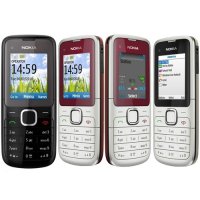
Nokia C1-01 RM-607 Firmware Flash Files
Here are Nokia C1-01 Firmware Flash Files
Free And Direct Download Links Are Given
Below .Click Below The Link To Download
DOWNLOAD NOW


Saturday, February 22, 2014
Nokia 1616 LCD Display No Light Problem Solution Jumper Ways

Nokia 1616 LCD Display No Light Problem Solution Jumper Ways
Nokia 1616 LCD Display No Light Problem Repair Solutions By Jumering
Friday, February 21, 2014
Open Firefox inside Firefox

This trick is pretty much easier to use. You only need mozilla firefox (any version).
Yup you can run Firefox inside firefox just by typing following url.
How about Opening Firefox inside Firefox which is again in another Firefox..?
Not bad huh?
And its really easy too just type in this url in Firefox’s address bar and there you go!
Firefox inside Firefox!
copy paste following url in a web browser (mozilla firefox).
chrome://browser/content/browser.xul
Thursday, February 20, 2014
Apple iPhone 5 Hard Reset Restart Solution
Step no 1.
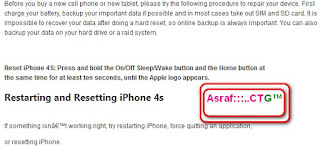 Step no 2.
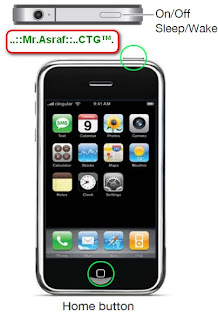
Step no 3.
 This Is The Simple Step By Step Procedure To Hard Reset Your iPhone 5.
If The Solution Is Not Working You Can Tell Us in comments. We Will replace The Alternative Solutions . Regard . Admin Mobiworkshop
Step no 3.
If The Solution Is Not Working You Can Tell Us in comments. We Will replace The Alternative Solutions . Regard . Admin Mobiworkshop
Wednesday, February 19, 2014
Autorun Cleanup Tool


Tuesday, February 18, 2014
Samsung C3303 Champ Lcd Lighting Jumper Solutions

Samsung C3303 Champ Lcd Lighting Jumper Solutions
Samsung C3303 Champ Lcd Lighting Jumper Solutions
Samsung C3303 Champ Lcd Lighting Jumper Solutions
Monday, February 17, 2014
How To Know That Your Computer Is Hacked

This post shows you the information about how to know that your computer has been hacked.
Given below are some of the tips that will show you that whether your computer is hacked or not.
1. It Seems as Though a Ghost Lives Inside Your Computer.
If you start noticing that your computer starts to act strangely, almost paranormal like for example maybe the cursor starts to move on its own, emails that you know were untouched in your inbox before suddenly vanish, passwords magically change, or numbers and other characters appear on your screen when you are more than sure that you didn’t even touch your keyboard then chances are your ghost lives in some house across the country and is controlling your laptop or desktop from a distance. As soon as you notice any kind of the unusual activity listed above, it’s recommended to immediately dis enable your wireless or unplug your Ethernet cable so the hacker cannot access your computer. Then you need to immediately scan your computer with your anti virus software so that it can remove any cookies or installed malicious software that the hacker administered to your computer. If you do not have anti virus software installed because you think it’s just too expensive, AVG offers a basic version for free.
2. Your Internet Connection has Suddenly Turned into a Turtle.
Since hackers have to operate from a remote location to gain control of your computer, typically it will slow down your internet connection speed substantially this is because more bandwidth is being used. Of course there can be other reasons why your internet connection is slow perhaps you have too many files. But just to make sure, it’s probably best to check your system logs to see if a second or third party has logged into your computer at any time. To do this, right click on my computer, select manage, click on computer management and then select event viewer and security.
3. Your Computer is Always Processing Information.
Lastly, if you re computer is idle, but your hard drives LED still blinks, then this is a definite red flag that a hacker has invaded your computer. Granted, an update may be occurring, but if it’s not you need to immediately disconnect your LAN or WiFi and do some damage control.
Subscribe to:
Posts (Atom)